Tetra True: A Bold Fusion of Retro Gaming and Modern Color
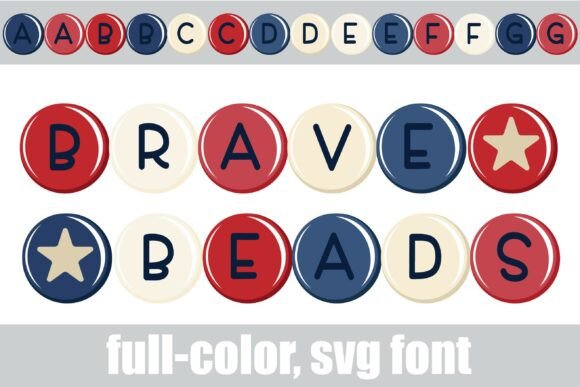
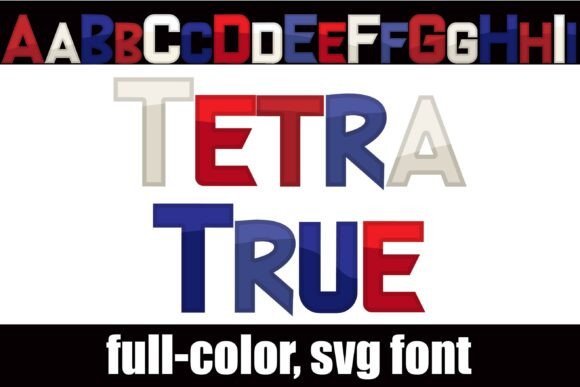
If you've ever found yourself scrolling through endless font libraries looking for something that truly pops, you know the frustration of finding a typeface that is "almost right." Tetra True solves that problem by bridging the gap between nostalgic video game aesthetics and the vibrant demands of modern design. This isn't just a standard display font; it is a full-color SVG typeface that arrives ready to impress. It features a distinct video game style structure rendered in bold Americana colors—think rich reds, crisp whites, and deep blues—creating a patriotic yet playful vibe that stands out immediately.
What makes this premium font particularly interesting is the versatility hidden within its glyphs. While the default styling offers a strong, cohesive look, there is an alternate case of different colorings for every letter. You can access these variations through your operating system’s character map or via the glyph panel in software like Silhouette Studio. This feature allows you to manually mix and match color schemes within a single word, giving you total control over the final aesthetic without needing to separate the text into individual objects.
The Technical Reality of SVG Fonts
Adopting a creative font like Tetra True requires a small shift in how we think about installation. Because it is an OpenType full-color (SVG) font, it installs just like any standard .otf file. On a Mac, you simply double-click to install via FontBook; on Windows, you can use your preferred font manager or the Control Panel. However, the experience of using it depends heavily on the software you are running.
It is crucial to understand that color fonts are a relatively recent innovation in the timeline of modern typography. Consequently, they will render as solid black in non-compatible programs. Even in compatible software, they often appear black in the preview window or font selection menu. You will only know for sure if the font is fully supported when you type on the document canvas and see the colors appear. Currently, major players like Adobe Photoshop, Illustrator, Silhouette Studio, Quark, and Inkscape have embraced full-color SVG fonts. If your workflow relies on older software or basic text editors, you may be limited to the black silhouette version of the typeface.
Where Tetra True Shines: Applications and Use Cases
Because Tetra True is vector-based, it scales beautifully without losing quality, making it a robust tool for various projects. However, its bold, arcade-inspired personality means it is not a one-size-fits-all solution. It is not a serif font for body text, nor is it a subtle sans serif font for corporate memos. Instead, it excels in high-impact scenarios.
- Logo Design and Brand Identity: For brands targeting a younger demographic, or businesses in the entertainment, tech, and gaming sectors, Tetra True offers an instant personality injection. It works exceptionally well for logo design where the brand name needs to be the hero.
- Packaging Design: Imagine this font on a box of retro candy, a patriotic holiday sale sticker, or a tech gadget package. The Americana colors evoke a sense of nostalgia and energy that standard black text cannot match.
- Social Media Graphics: In the fast-scrolling environment of Instagram or TikTok, you have milliseconds to grab attention. The vibrant hues and distinct shape of Tetra True stop the thumb. It is perfect for sale announcements, event headers, or bold statement quotes.
- Crafting and Hobby Projects: For users of Silhouette and Cricut machines, this font is a gem. It eliminates the need to layer vinyl colors manually to achieve a multi-color look, saving significant time during the production process.
Strategic Pairing and Readability
When integrating Tetra True into your design assets, restraint is key. Because the font is so visually dense and colorful, using it for long sentences can overwhelm the viewer. It is best used for headlines, sub-headlines, or single-word calls to action.
A critical aspect of using a display font like this is font pairing. To maintain a professional hierarchy, pair Tetra True with a clean, neutral typeface. A geometric sans serif font like Montserrat or Roboto works well to balance the retro energy of Tetra True. Avoid pairing it with a script font or handwritten font, as the clash of "handmade" and "digital pixel" styles can create visual confusion rather than contrast.
Evaluating Fit and Licensing
Before committing to Tetra True for a major campaign, always test the fit. Type out your specific message to ensure the letterforms connect well and the color alternates create the rhythm you desire. Check the readability at the size you intend to use it; while it scales well as a vector, the internal color details can get lost if the text is too small.
Finally, verify the licensing. Most commercial font licenses cover a specific scope of use—desktop, web, or digital ads. Since Tetra True is a specialized asset, ensure your license covers your intended output, whether that is printed merchandise or digital branding. Used thoughtfully, Tetra True isn't just a typeface; it is a design statement that brings energy and character to any project it touches.